Abode Home Security Starter Kit: The Speediest Setup I’ve Ever Seen

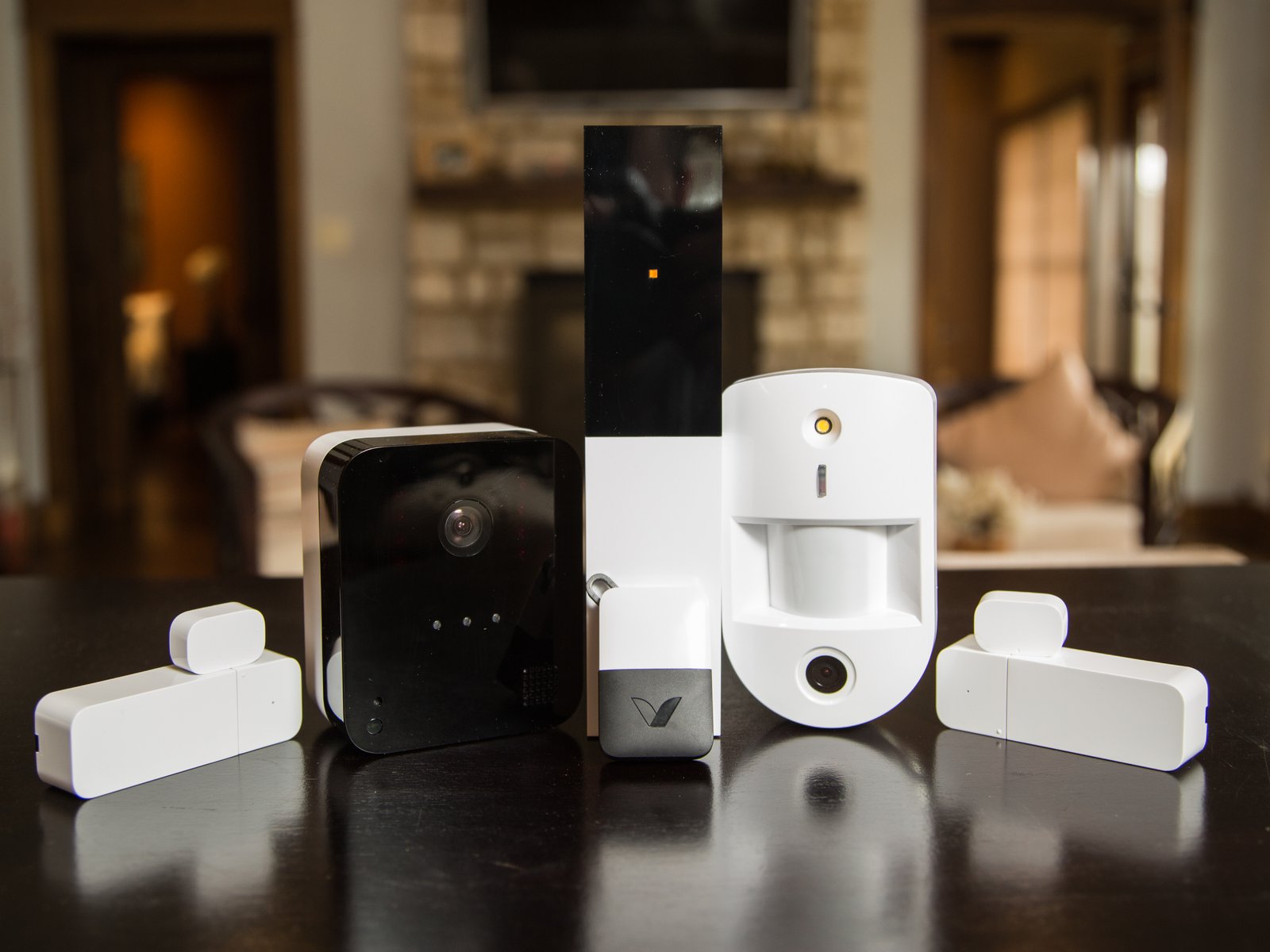
Abode’s security system is speedy and capable / Chris Monroe/CNET
Pros & Cons
-
Super snappy setup and installation with sensors connection in seconds and adhesive attachments -
Plans are available, but no subscription or contract is required -
Excellent third-party support for Google Home, Apple, Alexa, Sonos and more if you have an existing smart home -
CUE automations are simple to create through the intuitive app -
Lots of Abode add-ons including locks and cameras -
All-new, interesting sensors available in 2026
-
The standard hub does required a constant Ethernet connection, which could make setup difficult in some homes -
The app has some large ads, especially if you don’t have a subscription
Abode’s home security starter kit ($219 for the four-piece version) is one of my top choices for two reasons. The first is Abode’s unusual embrace of third-party platforms and devices, notably Google Home and Apple, but also Alexa, Sonos and several others, making it a good system to integrate into an existing smart home. The app experience is also intuitive and makes it easy to customize your system.
Second, Abode’s system wins fastest setup in my tests, with sensors that connect to the hub in record speed and ease, making installation a breeze, albeit with some requirements for using an Ethernet cord.
Oh, and while much of this kit remains the same in 2026 (although some of the devices are now more compact), Abode has added two new unique sensors that I’ve hardly ever seen before: a garage tilt sensor to see if your garage is opened or closed, and an outdoor access sensor for fences, gates, sheds, barns and similar spots, adding a new layer of usefulness.
Bottom line: Abode’s quick setup, optional monitoring services, solid performance and smart integrations make it one of the most appealing DIY security systems available today.
Abode makes your connected home more secure
Welcome to Abode
Setting up Abode’s starter kit begins with the related app. Download the Android or iOS software and follow the instructions to pair all of the accessories. The starter kit includes:
- Hub — Connects to your Wi-Fi router via an included Ethernet cable and power adapter. It works with select Z-Wave and ZigBee devices, has a 93-decibel siren and has a 12-hour backup battery. See the complete list of compatible Z-Wave and ZigBee devices here.
- Door/window sensors — Attach to a door, window, cabinet or anything else to track opening and closing.
- Motion detector –– This detector senses motion in whatever room you put it in.
- Key fob – Stick it on your keychain to arm and disarm your system remotely.
Sensors have adhesive and screw-in installation options included. Abode also sent us a live-streaming camera to test alongside the starter kit. Abode offers its own wireless doorbell for $150, a camera starting at $35, a smart lock for $135 and several other odds and ends, but these will all cost you extra in addition to the starter kit.
The same is true of Abode’s latest sensors, the garage tilt sensor ($35) and the outdoor access sensor ($50), which you can also add to the kit when you buy or afterward.

My Top Tricks for Installing Your First DIY Home Security System
My guide will show you how to plan, where to start and common mistakes to avoid with your security sensors.
Installation and setup

Abode’s hub requires a quick activation code input, a switch to engage the backup battery, and it’s ready to go — with one big caveat. This standard hub needs to be always connected to your router or modem with an Ethernet cable. That’s difficult for me because my router is in a spot where I don’t have enough outlets for adding a security hub. If your router is in a similar spot, you may have to run an Ethernet cable along the wall or floor to the Abode hub, which is an extra installation step.
It’s very weird that Abode’s hub doesn’t have built-in Wi-Fi support in 2026, when every other hub does. You can upgrade to the Abode Iota hub, which adds Wi-Fi and a built-in camera, but in a bundle that costs more than $400. The lack of other Wi-Fi options is quite frustrating, but it’s one of the only significant marks against Abode I found.
Once the hub is up and running, device setup is a breeze. In fact, it’s faster than any other security kit testing I’ve tried, thanks to sensors that automatically connect to the hub and start working the second you pull the battery tabs out. That means included sensors take literal seconds to install if you already have a spot chosen for them, a major bonus for busy home-havers.
Device performance

Once installed, I didn’t have a single bug or accuracy issue with Abode’s sensors and fob. They accurately and immediately switched between states, alerting me on the app according to the settings I had created (you can also receive emails for certain activations). It did grow annoying to have the hub beep every time some sensors were activated, but you can mute sounds using the app.
The outdoor sensor does take a little longer to install than the rest with its screws and additional housing, and I think the design could use some work. The plastic base, for example, has holes to punch out to make room for screws, but the plastic tabs were so tough this was nearly impossible with damaging the base, so take care when you’re ready to install.

Whether I was using an Amazon Alexa device, the key fob or the app, arming and disarming was responsive. I also created an IFTTT rule that turned on the interior entryway lights (via IFTTT-compatible Lutron switches) every time I opened the front door. Again, it worked great.
The system’s auto arm and disarm function, which can be tied to the location of your phone and other rules, also worked as expected. Abode’s app remained largely intuitive and easy to navigate through it all.
Note: Camera testing for this kit was from an early version of Abode’s camera, but it held up well in our reviews. Cameras won’t work with Apple, but the Abode video doorbell does have some support with Alexa and Google Home.
Home automations

Another Abode strength is the ability to connect to other smart home platforms. I already mentioned successful experiments with Alexa and Lutron devices, but Abode can connect to Google Home, Ecobee, Bose, Sonos, Apple HomeKit and more, which can greatly expand your potential routines.
I can’t confirm every device on these platforms will integrate with Abode, but I found it does add many more options, especially if you want to get a little creative. For example, you could have your smart lock unlock when a particular sensor (like the garage door sensor) unlocks, or you could have your house smart lights turn on when an entryway motion sensor detects movement.

You can set rules around how these automations work, all through Abode’s CUE tool, limiting them to only work at certain times or certain days of the week. You can also set delays, like only using alerts or automations after a sensor has been activated for a certain amount of time. In all, it’s a more flexible approach than most security systems support.
Abode subscriptions and monitoring options
You have three main monitoring options with Abode in 2026:
- Free – This provides live video, Apple HomeKit integration and support for other platforms like Amazon and Google.
- Standard ($8.50 per month) – Here users can forward alarms to a monitoring center, access an event timeline and gain access to more camera features, including AI detection for people and packages, and rich notifications with more informaiton.
- Pro – ($27 per month) – The Pro plan adds automatic forwarding of alarms to a monitoring center, celluar backup in case of a large-scale power failure and free shipping.
Abode’s options compare well with others, and are similar to SimpliSafe but with a better no-subscription tier, which is another reason it’s one of my DIY recommendations. The paid subscriptions are best suited if you add a camera to your system, but otherwise not really necessary.
The takeaway

Abode has excellent third-party platform support with a strong app of its own (albeit with too many ads for my taste), and the speediest setup I’ve tested, thanks to sensors that connect instantly to the hub for you. That hub will require a constant Ethernet connection, which is a pain for certain router setups and a bit outdated these days, but otherwise the system functions very well.
If you decide later that you want to add more devices, you can — either from Abode’s own cache of temperature sensors, flood detectors and cameras or from its list of approved Z-Wave and ZigBee devices. The fact that Abode doesn’t force you into a monthly fee and works with Alexa, IFTTT and Nest is pretty great, too. Take a close look at this system if you’re considering a flexible DIY security setup for your home.

See full bio